Share your computing skills tips and tricks with other members. Contribute and help others.


Google
 

Tuesday, July 29, 2008

Force old extensions / addons to work in Firefox 3

Force old extensions / addons to work in Firefox 3

Type about:config into the address bar.

Double click to change the following to change both to false

extensions.checkCompatibility

extensions.checkUpdateSecurity

or use this extension

Authors home page
http://www.oxymoronical.com/web/firefox/nightly

Labels:

Monday, July 21, 2008

Solve Firefox 3.0.1 Update Add-on Problems

Solve Firefox 3.0.1 Update Add-on Problems

Firefox released a security update on 16th July 2008. This is the first update ever released for Firefox 3. This updated version is known as Firefox 3.0.1 which includes some essential security fixes.

Some add-ons may not function with this update. Here is a way to overcome this problem. Go to the address bar and type: about:config once it shows the list of configuration preferences. Right click on the page and select New -> Boolean from the right click menu. This will pop up a window that asks for the name of the new preference; enter extensions.checkCompatibility and set the value to false. Restart firefox. Extensions which are not compatiable but worked with previous version of firefox will also work with updated firefox.

Labels:

Saturday, July 19, 2008

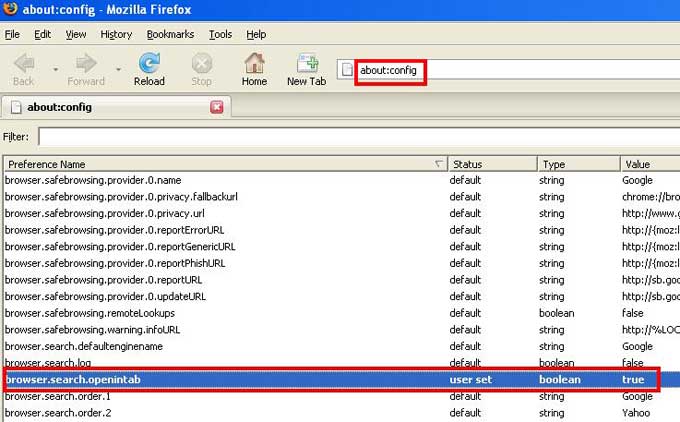
How to get Firefox search results in new tab

How to get Firefox search results in new tab


If you enter a search string in Firefox search box and press enter, by default results will appear in the current tab. If you wish to have them in a new tab do the following.

Type about:config in the address bar.
Scroll down to the entry labeled browser.search.openintab. By default its value is false. Double click it to make it true. Close firefox. Done. Here after your search results will appear in new tab

Labels: , ,


Privacy Policy